Content
An Interagency Billing Transaction (IBT) is a mechanism used by Nebraska state agencies, including the University of Nebraska system, to bill each other for goods or services, serving as an internal invoice. The billing agency initiates the IBT and sends it to the expending agency for approval and processing. For revenue IBTs, the University of Nebraska is the billing agency that is billing other State of Nebraska agencies for goods/services provided by the University of Nebraska-Lincoln (UNL) or the University of Nebraska Office of the President (UNOP).
Revenue IBTs
This guide provides procedures and key requirements for processing revenue IBTs for the Unversity of Nebraska-Lincoln and the University of Nebraska Office of the President. A revenue IBT allows UNL and/or UNOP to bill another State agency for services, contracts, registrations or other goods or services.
Expense IBT
In contrast, an expense IBT is the mechanism by which a State agency to bill UNL and/or UNOP for goods or services. P2P is responsible for processing expense IBTs.
Instructions
Department prepares IBT
When a University department has provided a good/service to another Nebraska State agency, billing for the good/service is accomplished through a revenue IBT.
A revenue IBT can only be issued to a Nebraska State agency. For non-State agencies, use other billing methods (check, ACH, etc.).
Request Access
In order to submit IBTs to Accounting for processing, the departmental employee must first request access to Accounting's SharePoint folder to which IBTs are submitted. To request access, contact Accounting at accounting@unl.edu
Prepare the IBT
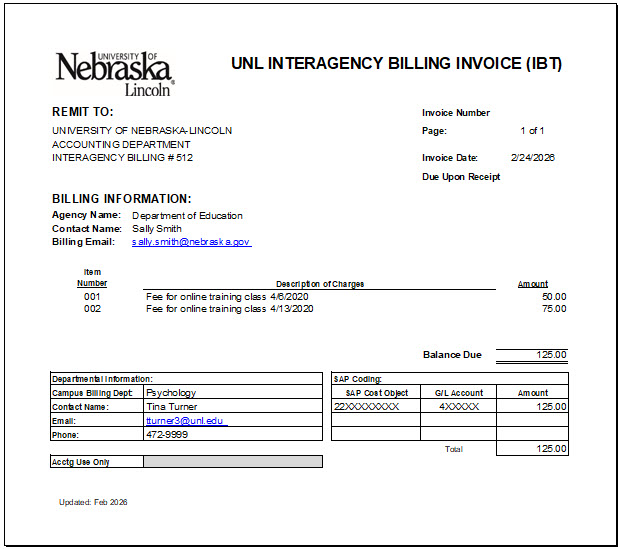
The UNL department completes the IBT form (in Excel format), saves it as a pdf file and submits to UNL Accounting for processing.
Complete the fields of the IBT form as follows:
- Remit To -- Do not change. The "remit to" address should always be: University of Nebraska-Lincoln, Accounting Department, Interagency Billing #512
- Invoice Number -- Leave blank. When Accounting enters the IBT in SAP, the SAP document number will be the invoice number.
- Invoice Date -- Enter the current date.
- Billing Information -- Enter the name of the expending State agency and the primary contact person's name and email address.
- Invoices to the Nebraska Department of Education must identify the "NE Department of Education" in the Agency Name field. This prompts Accounting staff to attach to the IBT additional documentation that is required by that department.
- Line Item Charges -- For each item being billed, enter the line number (starting with 001), enter a description and amount for that item.
- Balance Due -- The form will automatically sum the line item amounts and complete the balance due field.
- Departmental Information -- Enter the name of the campus billing department and departmental contact person's name, email address and phone number. This person is someone who can answer questions about the billed charges.
- Cost Object(s) -- Enter Cost Center(s) or WBS element(s) to which the revenue should be posted in SAP.
Cost objects- Must be unlocked prior to submission
- If locking is required, include 'Locked' in the file name. The IBT processing team will contact you to have the cost object temporarily unlocked for processing.
- GL account
- Revenue IBT for services, contracts, registrations, etc. provided
- Use External Revenue GLs (4XXXXX)
- Do NOT use GL 48XXXX
- Revenue IBT for expense reimbursement
- Use Expense GLs (5XXXXX) only for direct, dollar-for-dollar reimbursements of a previously incurred expense
- Use the same GL used for the original expense
- Do NOT use GL 59XXXX
- Revenue IBT for services, contracts, registrations, etc. provided
Submit the IBT
- Save the IBT form as a .pdf file. (Save only the IBT form page, not the instructions and example). If it the revenue will post to a locked cost object, be sure to include "Locked" in the file name.
- Combine the IBT pdf and all supporting documentation into one pdf file for submission.
- Submit the completed Revenue IBT by saving it to the Accounting SharePoint folder titled UNL Billing IBT (TN Doc)
UNL Accounting processes IBT
- IBT Processing Team posts TN entry in SAP within 3 business days of submission by UNL department
- SAP document number (9xxxxxxx) is generated and added to the invoice
- Debit and credit entries are automatically generated in SAP:
i. Debit: Accounts Receivable (145202 – UNL / 145209 – UNOP)
ii. Credit: Revenue GL (4XXXXX) or Expense GL (5XXXXX)
NOTE: Seeing a credit posted in SAP to the department’s cost center for the IBT does not mean payment has been received.
- TN entry automatically interfaces to State system (NIS) on the next business day and is reviewed and approved by UNL Accounting
- IBT Processing Team emails invoices to State agency and provides them with the SAP doc number
- When payment is received by UNL, SAP clears the accounts receivable and records cash:
- Debit: Cash (11XXXX)
- Credit: Accounts Receivable (145202 – UNL / 145209 – UNOP)
- Accounting follows up on unpaid IBTs
a. Accounting follows up with State agency on unpaid IBTs over two months old
b. UNL Departments may also follow up directly if needed.
Track IBT Payment
Find the SAP Document Number
- Run Actual line‑item reports using SAP transaction codes below:
- Cost Centers: KSB1
- WBS Elements: CJ74
- Locate SAP document number (9xxxxxxx) under the TN entry
Check Payment Status
- Review monthly “TN Aged Outstanding” report
- In SAP:
- Display TN entry
- Double‑click GL 145XXX
- A clearing date shown between Business Area and Assignment fields indicates payment except:
- UU correction entries posted by Accounting (clearing date ≠ payment)
- Reversals (clearing date reflects reversal date, not clearing date)
- In SAP:
Reversals or Deletions
Contact the IBT Processing Team to reverse a posted IBT or delete an invoice from SharePoint
Get Access and Help
SharePoint Access
To receive access to SharePoint to submit IBTs, contact Accounting at accounting@unl.edu.
Assistance
For assistance, contact the Revenue IBT Processing Team
Tam Nguyen – tnguyen134@unl.edu (Main)
Hongying Xiao – xiao@unl.edu (Main)
Teresa Brede – tbrede2@unl.edu
Akuol Riing – ariing4@huskers.unl.edu